Zion Rewards Program
Earn Zion Rewards every time you shop
Collect points on every order and redeem them for discounts at checkout – making every purchase more valuable.
Already have an account? Log in to view and redeem your points.
How Zion Rewards Works

1. Create Your Account
Sign up on Zion Herbals and join the Zion Rewards program. Already have an account? Simply log in to start earning.

2. Earn Zion Rewards Points
Collect points automatically every time you shop — no extra steps required.

3. Redeem Your Points
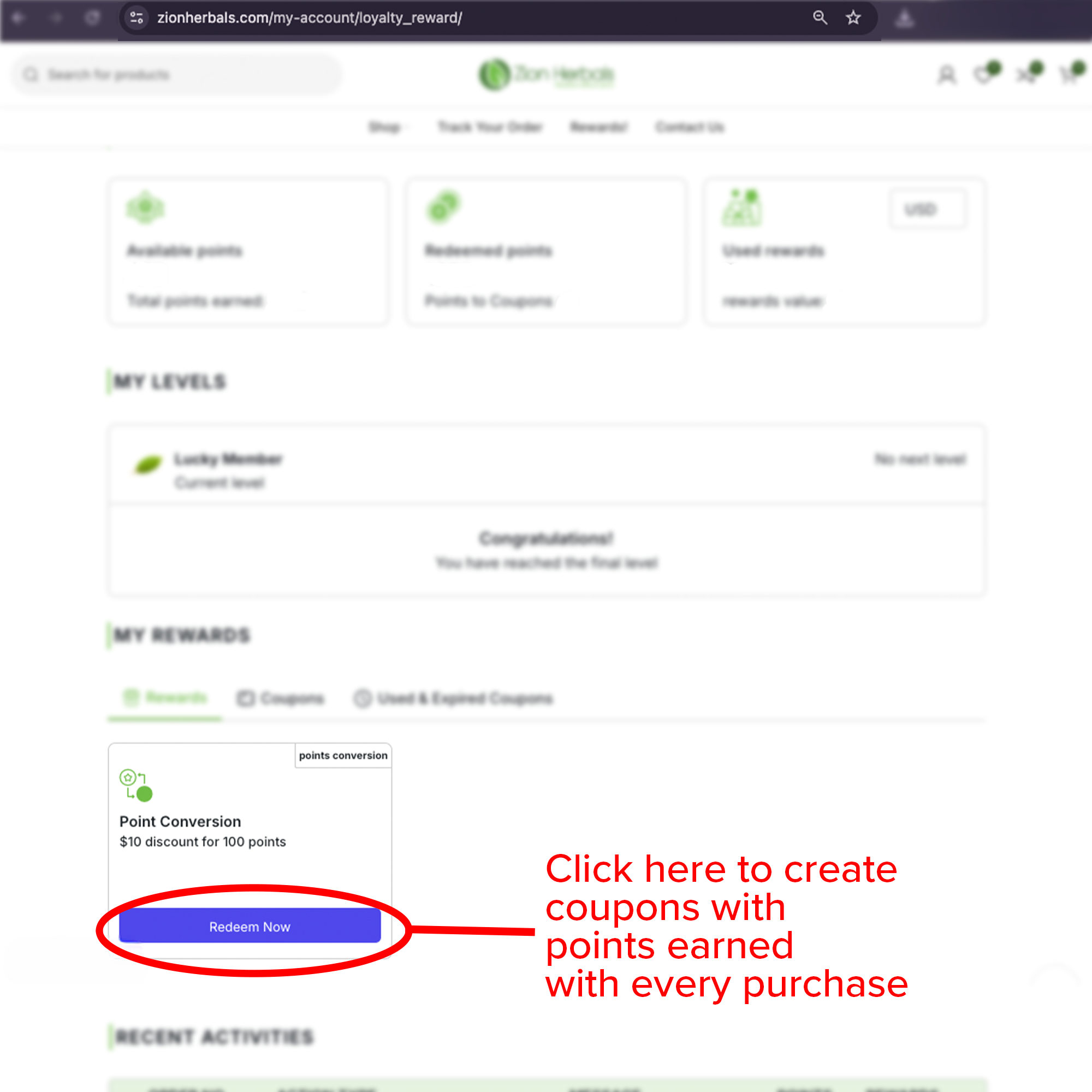
Convert your Zion Rewards points into discount coupons directly from your account.

4. Apply Your Rewards at Checkout
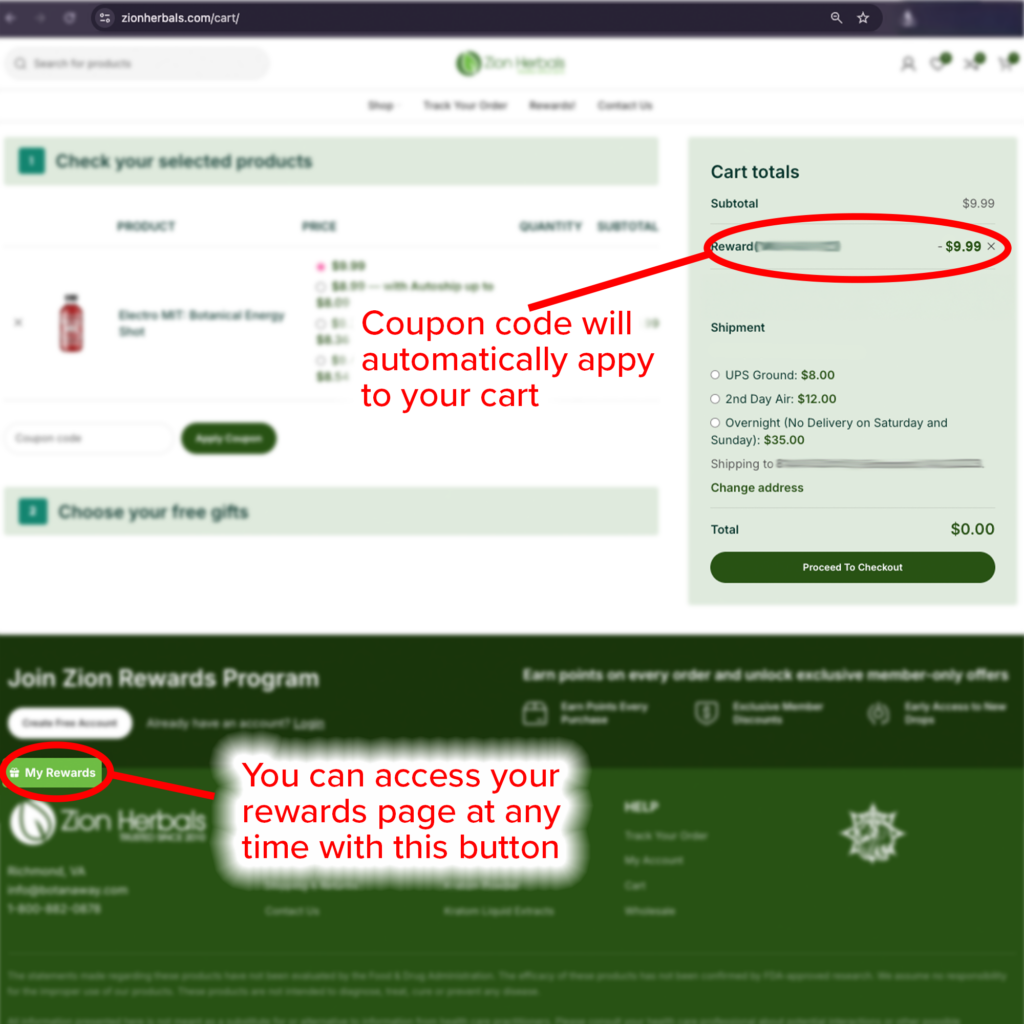
Use your rewards at checkout to save on your order and get more value every time you shop.
Zion Rewards – Points, Coupons & Program Details
Zion Rewards is designed to make every purchase more valuable. Earn points automatically when you shop and redeem them for discounts, promotions, or exclusive offers directly through your account.
How You Earn
Earn 5 Zion Rewards points for every $10 spent, with points accumulating across every order.
How You Redeem
Once you reach 100 points, you can convert your points into discount coupons and apply them at checkout.
Zion Rewards Tiers – Earn More as You Shop
The more you shop, the more you earn. With Zion Rewards, your loyalty is recognized through tiered membership levels that unlock additional points on every purchase.
As you collect points, you’ll move up through the Zion Rewards tiers – earning bonus points and increasing your rewards with every order.
Membership Tiers
🥉 Bronze Members
Earn 250–499 points and receive +4 bonus points
🥈 Silver Members
Earn 500–999 points and receive +6 bonus points
🥇 Gold Members
Earn 1,000–2,499 points and receive +8 bonus points
🍀 Lucky Members
Earn 2,500–9,999 points and receive +10 bonus points
1) Getting Started
In order to receive and redeem points, you must have a Login to Zion Herbals. You will then be able to access and view your points in your User Dashboard.
Do not have an account? No problem! Navigate to My Account in order to Register for your new Zion Herbals account.
Simply put your e-mail address in and follow the instructions e-mailed to you to get start!
Once in, you will find the Points & Rewards tab on the left side on your dashboard.
2) Manage Points & Rewards
In your dashboard you are able to redeem your points, view your available points, track points history and manage your used rewards.
You are able to receive $100 off per 100 points redeemed. By clicking “Redeem Now” you’ll generate a coupon code.
3) Redeem Points
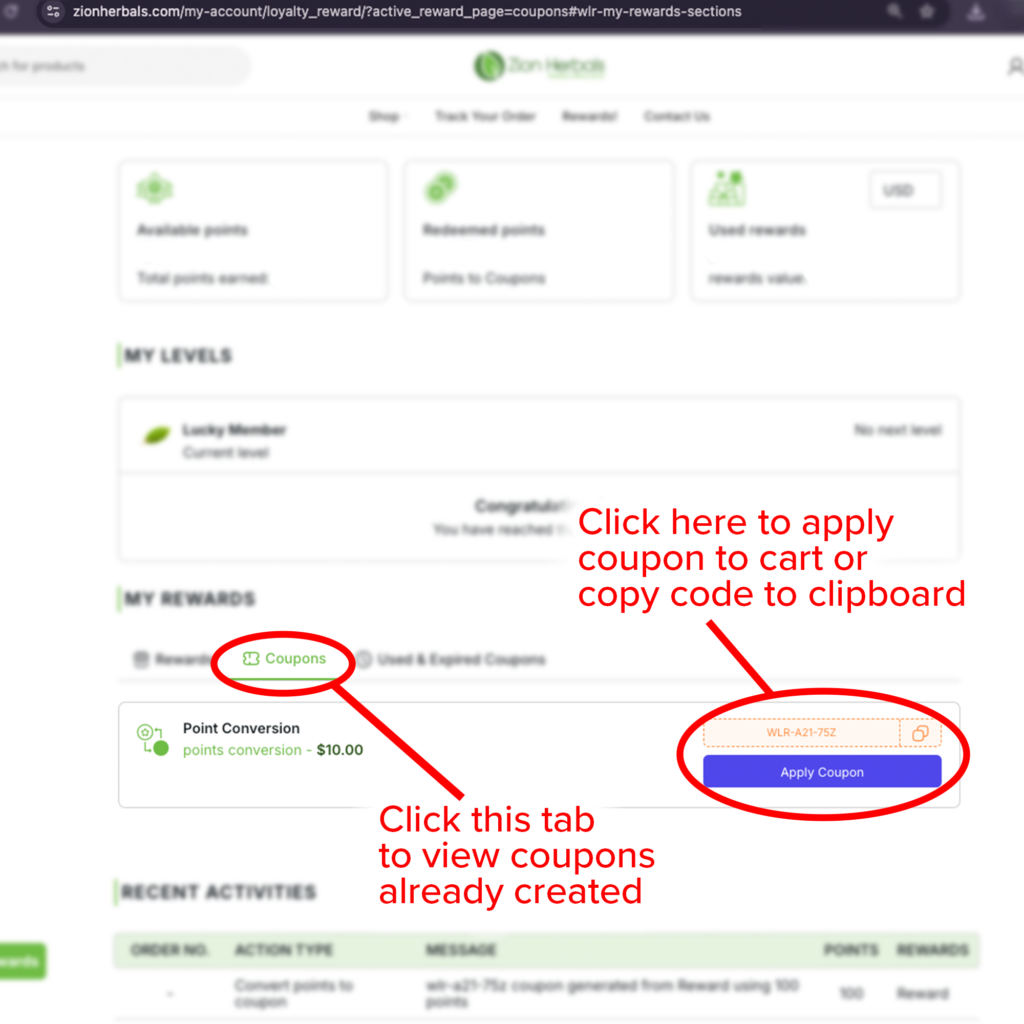
Once you redeem the points, it will generate a coupon code with your dollar amount discount.
You will be able to use immediately or you can save and store your points for later.
In this view you are able to track your recent activities as well!
4) Checkout
Now you are ready to paste your coupon code at checkout!
You are only able to use 1 coupon code at a time.
You will not be able to use any other coupon codes in conjunction with redeeming your points.
Super Secret Club Members!
Click 🔘 Save with Autoship on the product page, choose a monthly, bi-weekly or weekly delivery and you can save even more!
Ready to learn the secret handshake? 🖖
Just kidding! Everyone is welcome here at Zion Herbals! Subscribing gives you some awesome perks and ways to rack up points faster. ⚡ You can then redeem those points towards discounts, special promotions, or FREE items.
Even more savings – No awkward 👀 initiation required!
Our subscribers get 10% off weekly, 7% off bi-weekly and 5% off monthly on their favorite Zion Herbal products.
We’ll keep your items 📦💞 flowing consistently, so you won’t need to have that calendar 🗓️ marked.
Zion Rewards FAQs
Find answers to common questions about Zion Rewards, including how to earn points, redeem rewards, use coupon codes, and get more value from every order at Zion Herbals.
Zion Rewards is the Zion Herbals loyalty program that lets you earn points when you shop and redeem those points for discounts and special offers through your account.
You earn 5 points for every $10 spent at Zion Herbals. Points are added to your account when you shop using a registered customer account.
You can start redeeming rewards once you reach 100 points. From your dashboard, you can convert eligible points into a coupon code to use on a future order.
Yes. You need a Zion Herbals account to receive points, view your balance, and redeem rewards. The page explains that points and rewards are managed through the user dashboard.
After logging in, go to your User Dashboard and open the Points & Rewards section. There you can view available points, track points history, redeem points, and manage used rewards.
Once you redeem your points, a coupon code is generated in your account. You can copy that code and apply it at checkout to receive your discount.
No. The current page states that only one coupon code can be used at a time, and reward coupons cannot be used together with other coupon codes during checkout.
Yes. Zion Herbals currently lists tiered rewards levels including Bronze, Silver, Gold, and Lucky Members, with extra bonus points added on top of standard earned points once customers reach those thresholds.
es. The page says subscribers receive 10% off weekly subscriptions, 7% off bi-weekly subscriptions and 5% off monthly subscriptions, and it positions subscriptions as another way to build points faster.
The best way is to shop through your account consistently, monitor your points in the dashboard, redeem rewards when eligible, and take advantage of subscription savings if they fit your routine.